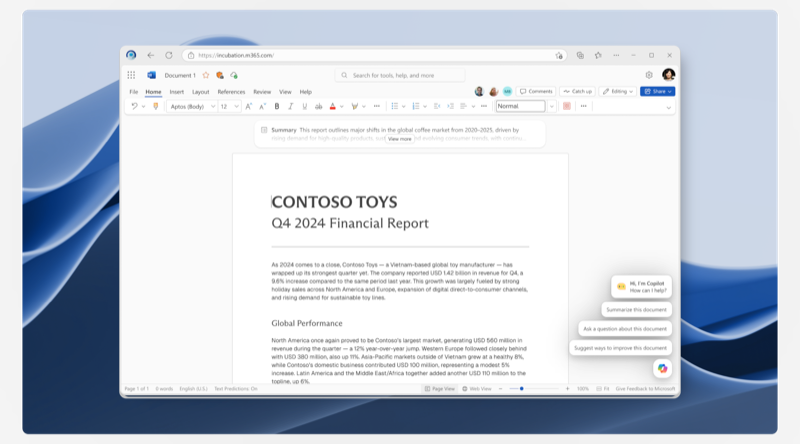
Copilot Growth: Low Friction Trials
Letting commercial users actually try Copilot — instead of being told what it can do.
Results
Commercial Microsoft 365 users normally have to ask IT for a paid Copilot license sight-unseen. When we let them try it for 30 days first, they took the trial, used it, and ended up requesting more paid licenses, not fewer.
More users started a free trial than would have requested a paid license without one
More users went on to ask their IT admin for a paid license after trying
More of those license requests were ultimately approved by IT
After general release, the trial is on track to drive about a 13% monthly increase in paid Copilot license assignments across commercial Microsoft 365. The baseline is tens of thousands of seats a month, so that translates to real revenue.
Across testing, we also identified the highest-converting call-to-action: "Upgrade Copilot" beat every other phrase we tried.
The Challenge
"Can I just try it? That would be so much better than telling me what I can do."
User research participant
For commercial Microsoft 365 users, paid Copilot is hard to grasp. Generic value props don't tell anyone what it'll actually do for them. And the standard path is to ask IT or submit a license request, so the people who'd benefit most couldn't decide for themselves.
We tried a lot of ways to explain or show it generally. Feature previews. Painted-door flows where clicking "Upgrade" showed you what would happen if you upgraded. But people wanted to understand how their own work and day could actually change.
Paid Copilot's whole point is access to your Microsoft Graph: your emails, Teams conversations, documents, spreadsheets, and PowerPoints, with a conversation across all of it.
What we shipped
Low Friction Trials. 30 days of full paid Copilot. No credit card. No admin assignment required.
Research surfaced five trial phases, each with its own user goal. I led design for the on-product moments; the lifecycle email and admin license-request teams partnered in parallel.
Strategic Constraints
Three constraints shaped every decision.
Cost of goods
Every paid query runs expensive inference. We couldn't open trials to everyone, so the funnel stayed narrow. High-intent entry points only.
None of the surfaces were ours
Copilot, Word, Excel, PowerPoint — none of those surfaces were ours. Every change needed their collaboration. More often I was the one arguing it: yes, we're asking for more attention than this surface usually does, but the user signed up for that the moment they started a trial.
The product changed under us
Copilot ships fast. The premium value prop shifted multiple times during the project. Copilot in Word/Excel/PowerPoint was the headline, then the implementation changed, then the offer changed again.
Designing for hesitant users
Research surfaced two primary anxieties.
"Am I allowed to do this? Should I tell my manager?"
User research participant
The first was permission. A "free trial" sounds like a future bill, even when it isn't, and people weren't sure whether starting one was something they should be running by their manager.
The second was privacy. Paid Copilot reads your private files and conversations. Even when your admin already has access, "Copilot is now reading my email" lands differently as a feature than as a fact.
We answered both directly in the in-product copy.
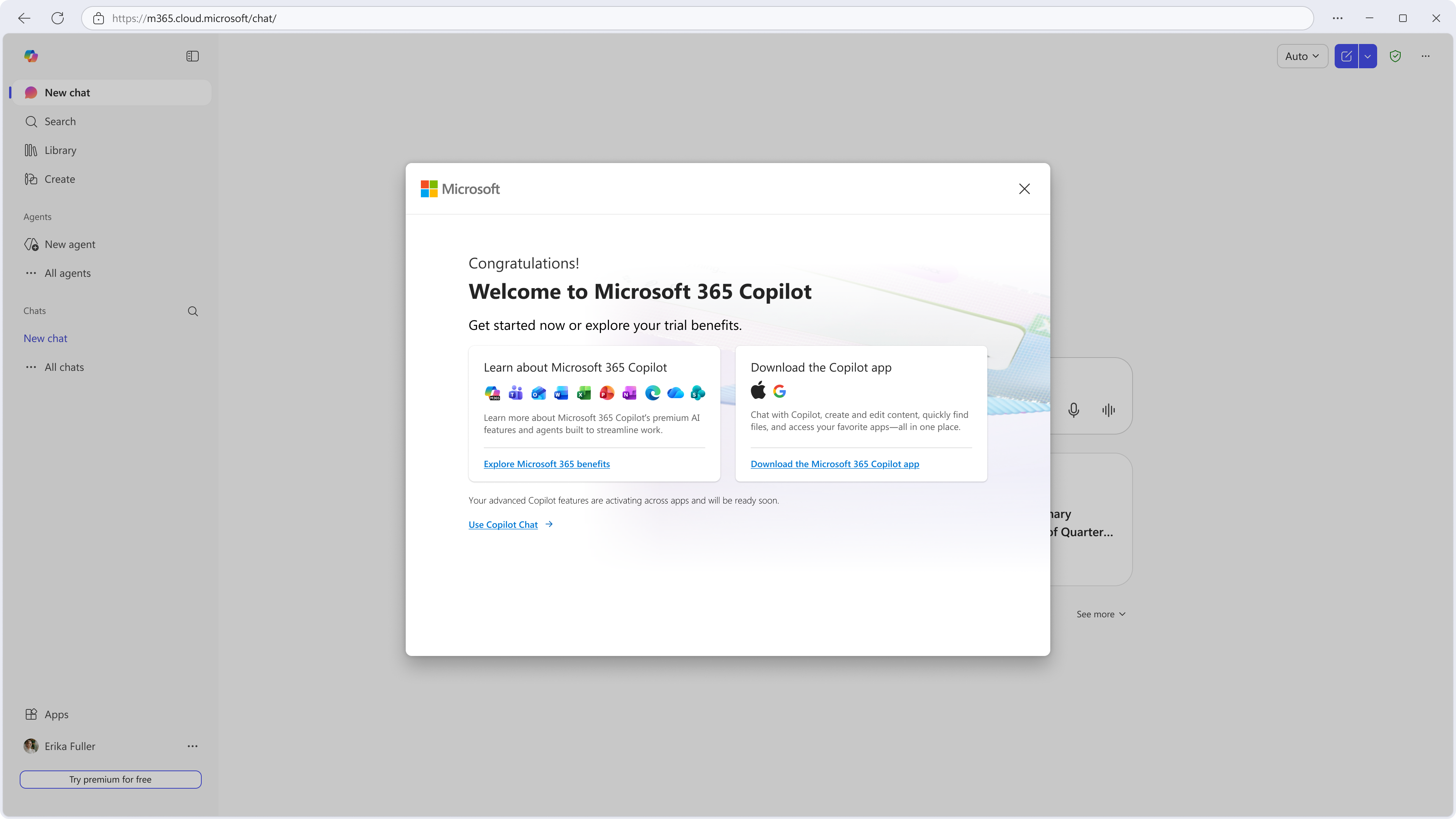
Permission. The offer-screen subline carries it in one breath: "…approved by your business, no payment needed." Both reassurances land before the user has reached the buttons.
Privacy. The welcome state spells out what Copilot can and can't see, so the user doesn't have to ask.
A separate work stream allows admins to toggle this off if they want, meaning keeping the experience on is an endorsement as well, adding trust.
A signal from inside the org beats anything Microsoft can say in-product.
What do I do with this?
The same people who told research "I just want to try it" often had no idea what to do once they had it.
Copilot's best moments are personal: combine these two files into a presentation; summarize what my manager said this week. That makes a suggested prompt risky. Putting "Try Researcher!" on the homepage and getting back twenty minutes of irrelevant output would have hurt the value we were trying to prove. A bad nudge is worse than no nudge at all.
Time-to-value first
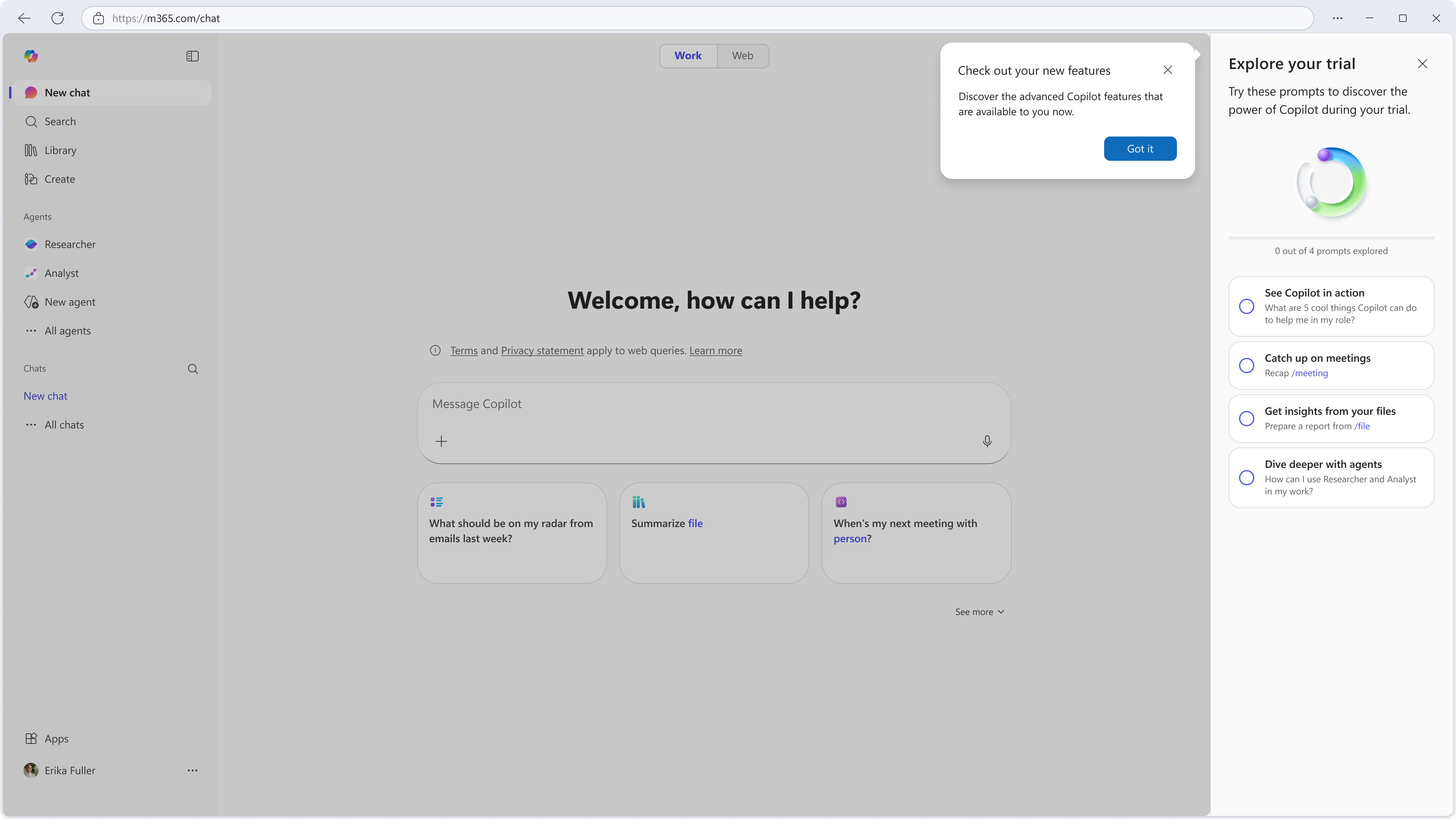
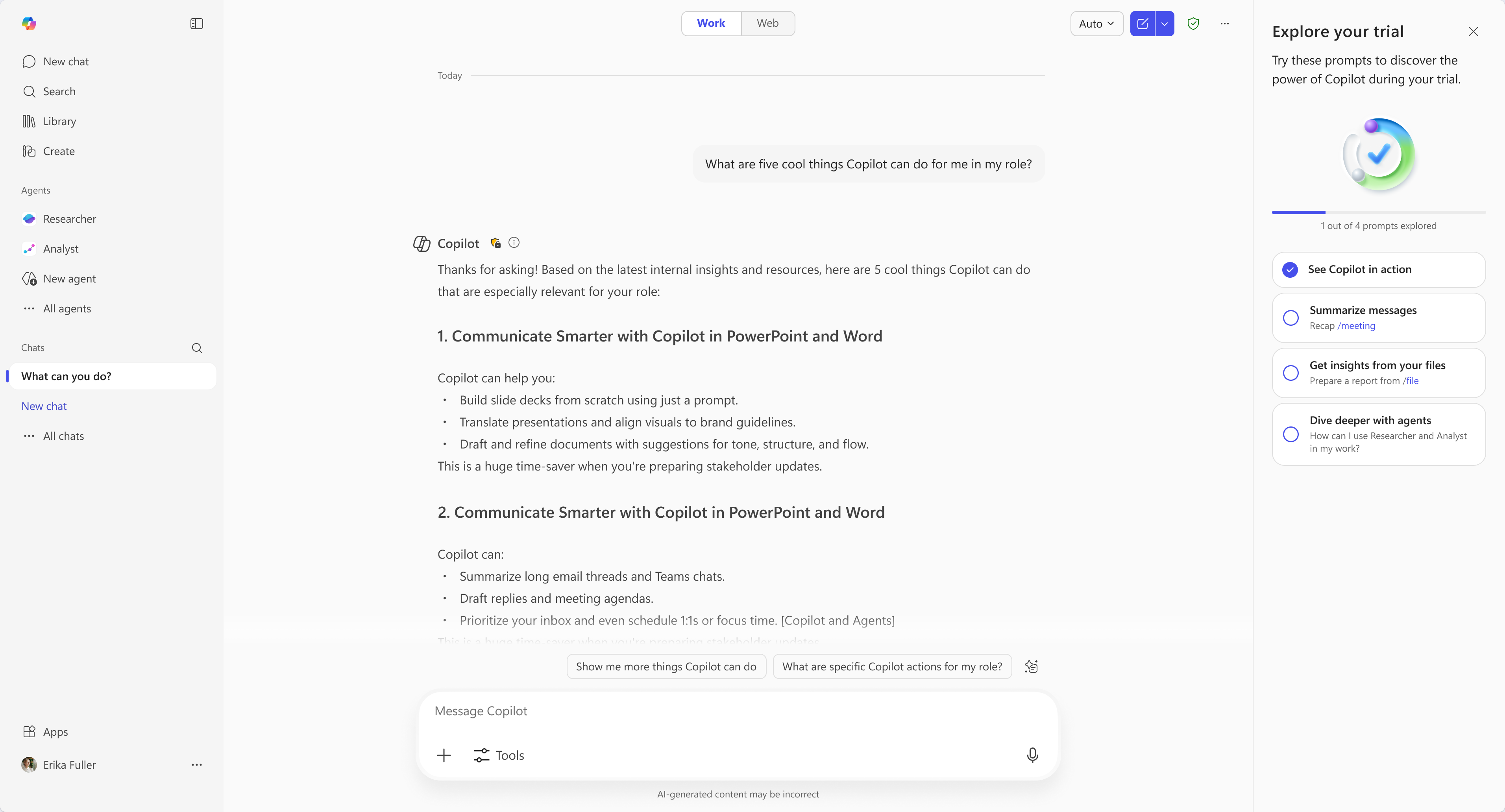
One task in the checklist is something Copilot almost always nails: "Show me five cool things you can do for me." Copilot already has your role, your manager, your company. The answer comes back specific to who you are. That's the trial's first impression, and it's a safe one.
Educational scaffolding
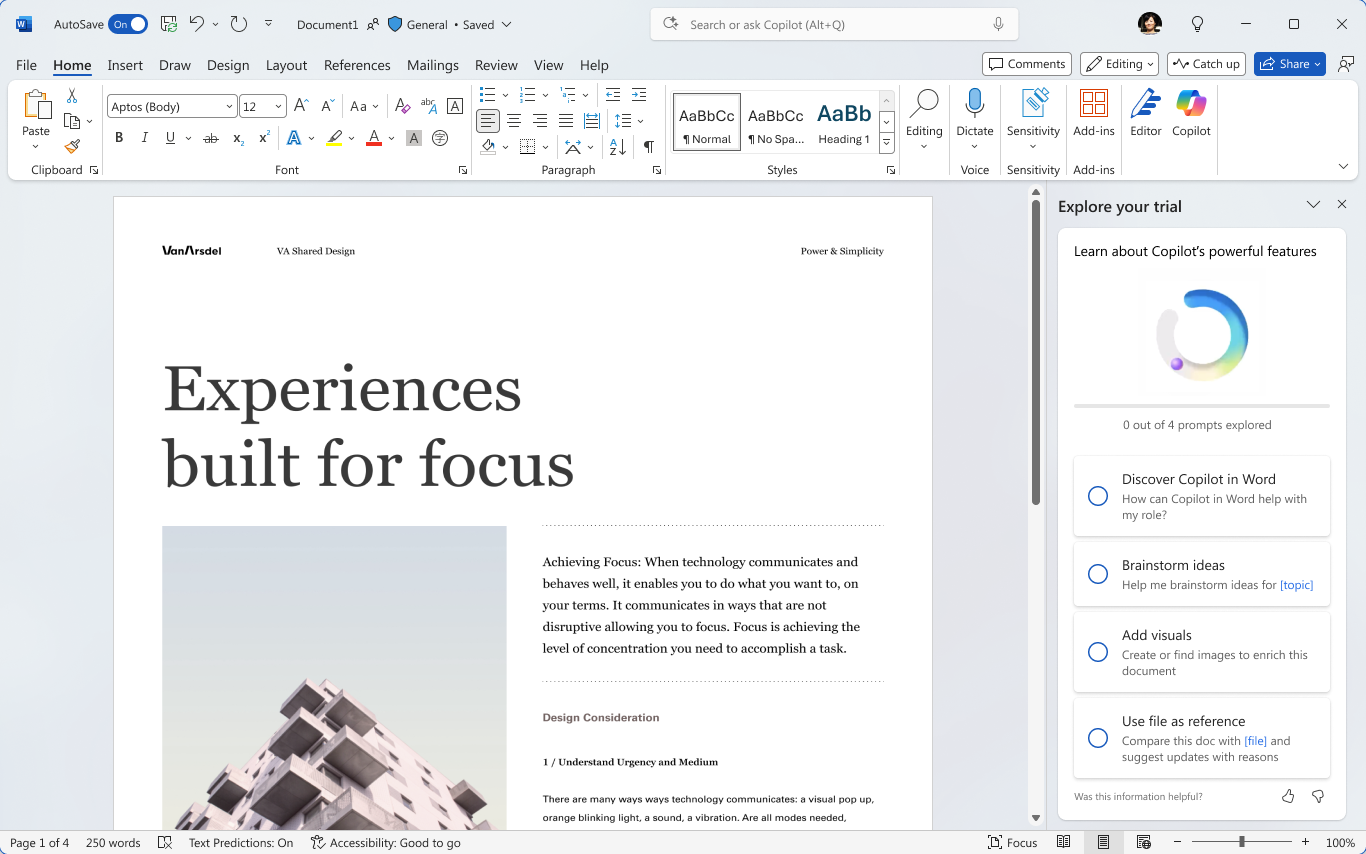
Four prompts isn't a lot of room. The split was my hypothesis going in: two prompts that actually get something done for you, and two that quietly teach you how Copilot works. Research and content signed off, the team agreed, and that became the brief.
The doing prompts came from where the data already pointed. Recap /meeting and summarize + report creation showed up over and over in our DS and UXR readouts.
The teaching prompts do two things at once. They give people the personalization users keep asking for — every answer is grounded in who you are and what you do. And they teach the move underneath: Copilot itself is the place to ask "how do I use this thing?" That's a skill that pays out long after the trial is over.
Five cool things has been the breakout. It works across surfaces — users get a personalized list back and it's their first real "oh, this is for me" moment with Copilot. Agents are the harder one. Most users have no idea agents exist. Pointing at a specific agent would have repeated the Researcher problem, so we ask Copilot itself: "How can I use agents in my role?" and let Copilot take it from there.
The Word version uses the same shape. Two doing, two teaching, Copilot doing the personalization underneath.
The cohesion job
Some of the most important work on this project was the least visible.
The trial touches the Copilot app, Word, Excel, PowerPoint, mobile, the transaction dialogs that handle license assignment, onboarding side panes, and the IT admin's license-request flow. Each surface has its own design partner, PM, engineering team, and release cadence.
A lot of the design work was being the place where coherence lived. That meant pulling stakeholders into the same room, watching for decisions on one surface that would break another, and pushing back when "we can't" was really "we won't." When the mobile design team picked up their version of the trial, they used my framework as their starting point.
Project reflections
What I wanted to show you
In a deeply siloed org, design is often the only function looking at the whole picture: the connectors, the value prop, the engineering constraints, the policy nuance, the user's hesitation about all of it. That isn't a complaint. It's the job, and a lot of days it's the most interesting part of it.
What I learned
Most growth instinct is to add: nudges, banners, surfaces. The trial taught me the opposite move was usually the right one. Pick one moment. Make the path real. Trust users with the rest. A person who clicks "Upgrade" is telling you something a person who dismisses a banner isn't.